



If you are wondering how to make a website for your business, the short answer is that it comes down to eight clear stages: Planning → Content → Platform → Design → Development → SEO → Testing → Launch.
Many business owners get stuck because they try to write code or choose visual templates before answering basic business questions. What should the website achieve? What pages do you really need? And how do you make sure visitors actually reach out instead of leaving after five seconds?
In this guide, you will learn the exact steps to create a small business website that looks sharp, loads fast, and generates enquiries without unnecessary technical headaches.
Quick Rule of Thumb
A successful business website does not need dozens of pages or complicated animations. It only needs to do three things well: explain what you do in simple words, show proof that you are trustworthy, and give visitors a friction-free way to contact you.
1. Decide What You Want Your Website to Do
Before touching a website builder or picking color palettes, define the single primary job of your website. Different business models have different goals:
- Service providers & consultants: The goal is usually getting inquiries, phone calls, or scheduled consultation calls.
- Local businesses: The goal is showing your location, operating hours, phone number, and services so local customers can visit or call.
- Contractors & agencies: The goal is showcasing past projects and client proof to justify premium rates.
- Ecommerce brands: The goal is direct online transactions.
When you know your primary goal, every page, headline, and button on the site becomes much easier to plan.
2. Understand Your Target Customer
A website should be written for the person hiring you, not for your own ego. When a potential customer lands on your homepage, they have specific questions in mind:
- Does this business solve my exact problem?
- Are they legitimate and experienced?
- What makes them different from local alternatives?
- What is the first step to get started?
When your website answers these questions directly in simple, confident language, visitors feel understood and are significantly more likely to reach out.
3. Choose the Right Type of Website
You do not need an over-engineered website to look professional. Choose the format that fits your stage:
- A focused landing page: Ideal for single-offer businesses, new service launches, or paid ad campaigns. Everything lives on one clean, high-converting page.
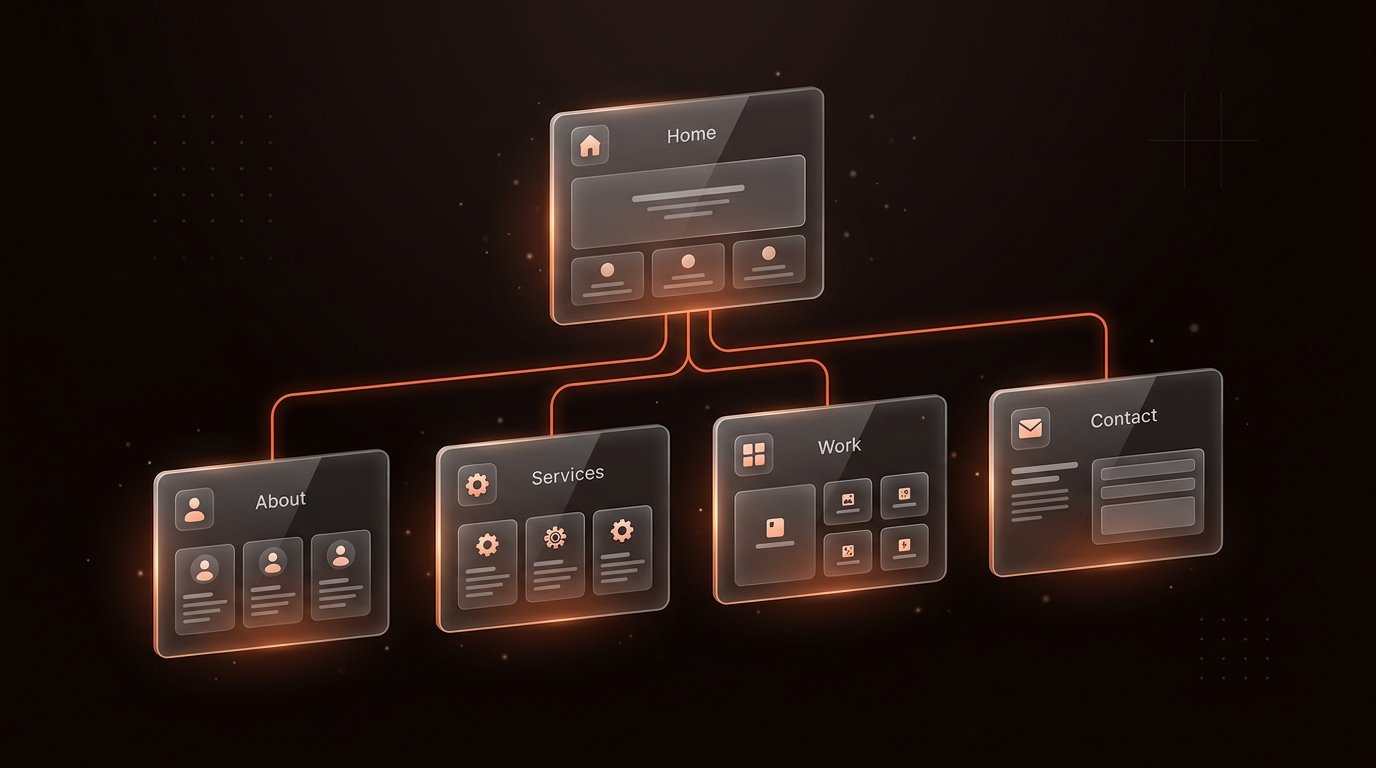
- A 4-to-6 page small business website: The standard format for established companies. It provides dedicated pages for Home, About, Services, Work, and Contact.
- A local business presence: Focused on local search visibility, customer reviews, and clear contact options.
- A booking website: Features integrated calendar booking (like Cal.com) so clients can schedule intro calls directly.
4. Plan the Website Pages
Do not create pages just for the sake of having them. For most service and small businesses, five core pages are more than enough:
- Homepage: A strong headline stating what you do, who you serve, core proof, and your primary call to action.
- Services Page: Clear breakdowns of what you offer, who each service is for, and what working together looks like.
- About Page: Your background, story, and values to build a personal, human connection.
- Work / Case Studies Page: Real visual examples of your work and client outcomes. For example, our Hansraj Solutions case study shows how an industrial business presents its solar capabilities cleanly.
- Contact Page: A clean form, email address, direct phone link, and location details.
5. Prepare Your Website Content
One of the most common mistakes in business website development is designing first and writing text later. When you write your copy upfront, the layout naturally serves your message.
Before building, gather these essential assets:
- One-sentence value proposition: What do you do, for whom, and what result do you deliver?
- Service descriptions: Bullet points detailing what is included and how the client benefits.
- Authentic photos: Genuine pictures of your team, office, or real projects instead of generic stock images.
- Client testimonials or reviews: Real quotes from past customers to validate your work.
- Transparent pricing notes: Even if you offer custom quotes, sharing a starting price or typical range helps qualify serious enquiries.
6. Choose a Website Platform
Selecting where to build your website depends on your maintenance preferences, budget, and design expectations:
- Framer: A modern, visual builder that generates clean code with zero server maintenance, automatic SSL, and lightning-fast global CDN delivery. Perfect for marketing sites, startups, and service businesses. Read our in-depth comparison: See the Framer vs WordPress guide
- WordPress: The open-source giant. Excellent if you manage a massive content publication with hundreds of articles or complex custom database requirements, though it requires regular plugin updates and hosting management.
- Custom HTML/CSS/JavaScript: Maximum speed, minimal overhead, and zero dependence on third-party CMS platforms.
7. Design the Website
Great website design is not about flashy animations or artistic clutter. It is about readability, hierarchy, and ease of navigation:
- Visual hierarchy: Important elements (headlines, buttons, key benefits) should naturally catch the eye first.
- High contrast: Ensure text is crisp and easily readable on dark or light backgrounds.
- Generous whitespace: Give paragraphs and sections breathing room so the page never feels cramped.
- Consistent styling: Stick to one clean heading font, one body font, and a single accent color for primary buttons.
8. Build the Website
Once layouts and copy are ready, building begins. This involves assembling the structure, configuring typography, setting up navigation links, and ensuring every interactive element functions reliably.
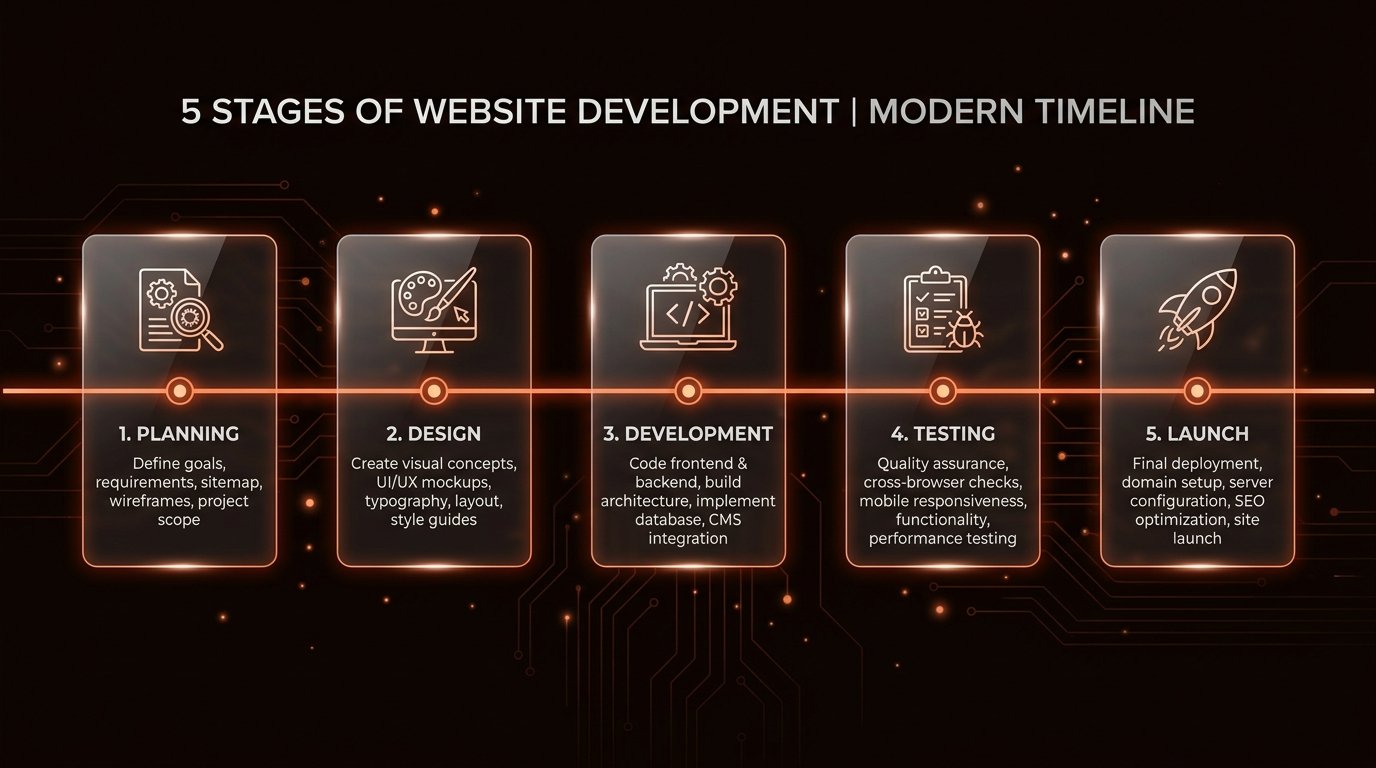
To see how an end-to-end client engagement is structured, explore our transparent 5-step website development process.
9. Make It Mobile-Friendly
More than 60% of all website traffic originates from smartphones. If your website is slow or clumsy on mobile, prospective customers will hit the back button immediately.
Mobile optimization means:
- Buttons are large enough to tap easily with a thumb.
- Text is comfortably readable without zooming or panning.
- Navigation collapses into an intuitive mobile menu.
- Images scale proportionally without causing horizontal scrolling.

10. Add Basic SEO (Search Engine Optimization)
A website cannot attract clients if search engines cannot understand it. Set up these fundamental on-page SEO elements:
- Page Title: A descriptive title tag under 60 characters explaining your business and primary service.
- Meta Description: A 1-to-2 sentence summary that clearly communicates what the page offers to searchers.
- Proper Heading Tags: Exactly one H1 tag per page, followed by logical H2 and H3 subheadings.
- Clean URL Structure: Short, readable URLs like
/services/web-design/instead of messy query strings. - Descriptive Image Alt Text: Accurate text descriptions for accessibility and Google image search.
- XML Sitemap: An automated sitemap submitted to Google Search Console so crawlers can discover your pages.
Remember: SEO is a long-term discipline. No honest developer can guarantee "#1 rankings on Google overnight," but setting up clean technical foundations gives your business the best possible start.
11. Add a Clear Enquiry System
Do not make clients hunt for your contact details. Place contact options where visitors expect them:
- A visible "Contact" or "Get a Quote" button in your top navigation header.
- A simple contact form requiring only essential fields (name, email, brief project note).
- Direct email and phone links in your website footer.
- An integrated calendar link for qualified prospects who prefer booking a call directly.
12. Test Everything Thoroughly
Before sharing your new site with the world, run a comprehensive pre-launch QA check:
- Forms: Fill out your contact form and confirm that emails arrive in your inbox.
- Links: Click every navigation link, footer link, and button to ensure zero broken links.
- Devices: Test the site on an iPhone, an Android phone, a tablet, and a laptop.
- Speed: Verify that pages load quickly and that images are properly compressed.
- Spelling & Content: Double-check phone numbers, email addresses, and service details.
13. Launch
When testing is complete, launch your website:
- Point your custom domain name (e.g.,
yourbusiness.in) to your hosting provider using DNS records. - Verify that your SSL certificate is active so visitors see the secure padlock icon (
https://). - Submit your live sitemap to Google Search Console to request indexing.
- Share the link across your business channels, social profiles, and email signatures.
14. Maintain and Improve Over Time
A business website is not a static project you finish and forget forever. Review your website analytics every month to see which pages visitors read most often, update your portfolio with new projects, and refine your copy based on questions real customers ask.
To understand the full business impact a website can have, read our guide on How Can a Website Help My Business?.
DIY Website vs Hiring a Professional Developer
Should you build your website yourself or hire an experienced professional? Here is an objective comparison to help you choose:
| Factor | DIY Website (Wix, Squarespace, Templates) | Hiring a Professional Developer |
|---|---|---|
| Best Suited For | Brand-new startups with minimal budget and ample free time | Established businesses, founders, and service providers who need a high-converting result |
| Upfront Cost | Low (monthly software subscription & domain fee) | Higher upfront investment |
| Time Required | 30 to 80+ hours spent learning, tweaking layouts, and troubleshooting | A few focused hours for discovery calls and feedback |
| Design Quality | Restricted to pre-made templates that often look generic | Tailored layout built specifically around your brand and conversion goals |
| Performance & Speed | Frequently weighed down by bloated template code | Optimized for fast mobile loading and clean SEO foundations |
If you are testing an unproven business concept with zero revenue, building a simple DIY site makes practical sense. But if your time is better spent serving paying clients and growing your business, hiring a professional pays for itself by launching faster, looking more credible, and capturing more enquiries.
Common Mistakes That Hurt Business Websites
- No clear goal: Having a website that looks visually pleasant but never guides the visitor to take an action.
- Walls of dense text: Overwhelming visitors with huge paragraphs instead of scannable bullet points.
- Neglecting mobile users: Designing only for desktop screens when most of your customers visit on mobile phones.
- Weak or hidden calls to action: Leaving visitors wondering what steps to take next.
- Slow loading speeds: Uploading uncompressed images that take 5 seconds to load over mobile networks.
- Missing trust elements: Not showing real photos, past work, or client reviews.
Business Website Launch Checklist
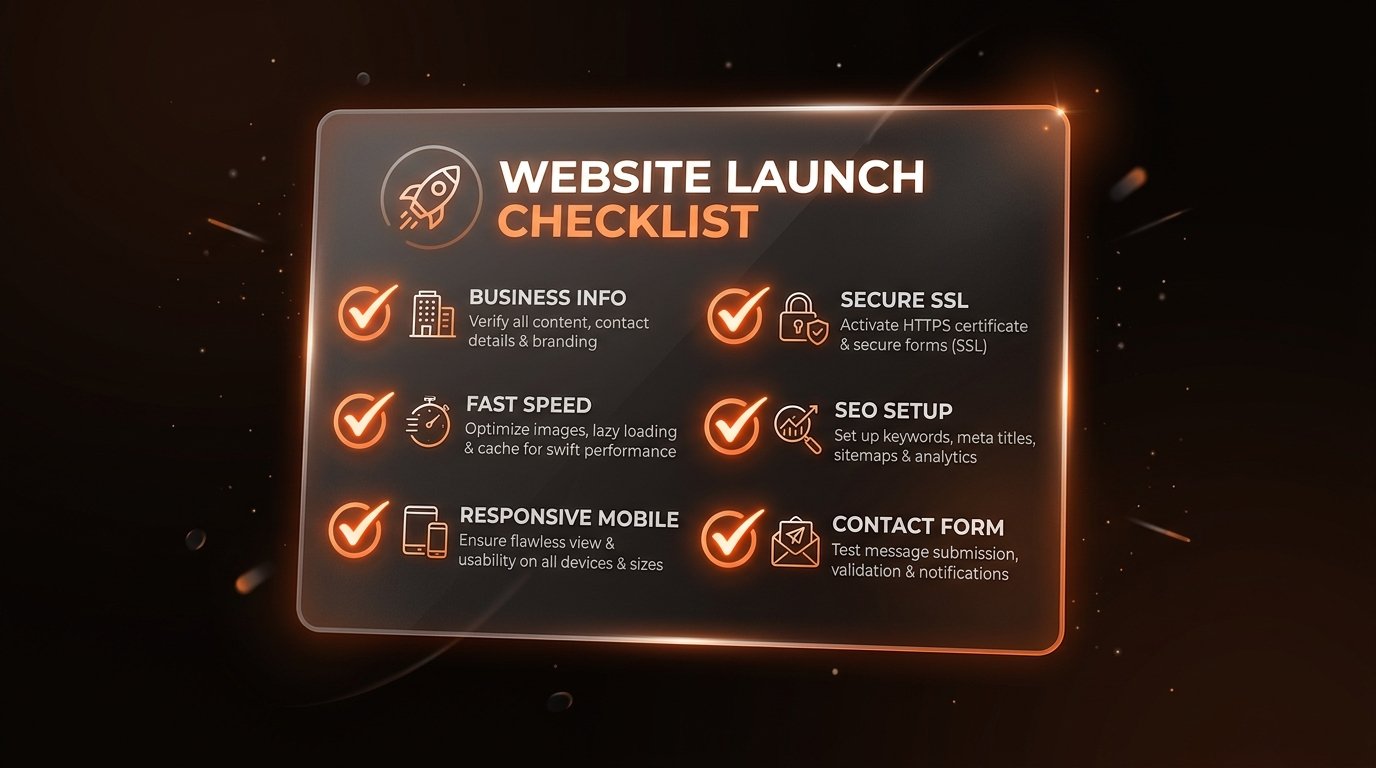
Ensure these fundamentals are complete before launch:
- ✓ Clear headline explaining what you do and who you serve
- ✓ List of primary services with customer benefits
- ✓ About page introducing your background and values
- ✓ Past work examples or client testimonials for proof
- ✓ Working contact form tested with verified email delivery
- ✓ Clickable phone number and email address
- ✓ Fully responsive mobile layout tested on smartphones
- ✓ Secure SSL certificate (https://) active on your domain
- ✓ Basic SEO metadata configured on every page
- ✓ XML sitemap submitted to Google Search Console
Frequently Asked Questions
Do I need technical or coding skills to make a business website?
No. With modern platforms like Framer or managed WordPress setups, business owners can easily edit text, add images, and post updates without touching any code. For initial setup, hiring a professional developer ensures clean technical SEO, mobile responsiveness, and speed.
How much does it cost to make a website for a small business?
Costs depend on whether you use a DIY website builder ($15–$30/month plus domain) or hire a professional designer and developer ($500–$2,500+ depending on scope). A professional build saves dozens of hours and ensures high conversion and search engine readiness from day one.
How long does it take to make a business website from scratch?
A focused business website or single-page landing page typically takes 1 to 3 weeks when working with an organized freelance developer, assuming business details and copy are ready.
What is the most important page on a business website?
The homepage and contact page are most critical. The homepage establishes trust and explains your core offer within 3 seconds, while the contact page removes friction so interested prospects can book a call or send an enquiry.
Final Takeaway
Making a website for your business is not about chasing design trends or writing complex code. It is about creating a clear, trustworthy digital home where interested prospects can understand your services and contact you without hesitation.
If you take it step by step—defining your goals, writing clear content, choosing the right platform, and focusing on user experience—you will build an asset that supports your business for years to come.